
Is your Mac behaving the sluggish manner? If your answer to this is yes then you surely need a clean up to boost its performance. In this article, check the best practices that you should follow for Mac Cleanup.
- Uninstall Unused Applications
Applications occupy the larger space on the Mac and it is essential to clean the apps that are no more used by you. You will surprise to know that simply sending the Apps to trash won’t delete them completely. As when apps are deleted they left over several gigabytes. Thus it is necessary to delete them from the folders. Navigate through the below-mentioned folder and delete them from there to completely get rid of them.
- App preferences are located in ~/Library/Preferences/
- Support Caches can be found in /Library/Caches/ and ~/Library/Caches
- App states are found in ~/Library/Saved Application State/
- App preferences are located in ~/Library/Preferences/
- Support Caches can be found in /Library/Caches/ and ~/Library/Caches
- App states are found in ~/Library/Saved Application State/
- Application files are found in ~/Library/Caches.
- Crashes are located in ~/Library/Application Support/CrashReporter/
- Empty the Trash
The easiest and quickest way to free up some space is emptying the trash. Remember that iMovies and iPhotos have their separate trash so it is important to clean up their trash as well. There is no reason to keep the trash full when you take the regular backups time to time. In fact, the mail, junk, and trash automatically get deleted if you set the relevant preferences for them.
- Remove Mail Attachments
There are documents attached in the mail and when you open them then there are chances that you download them by double-clicking. These attached documents can be images, PDFs, Text documents, etc. These get save in the Mail download folder and consume a lot of space. You can simply delete them by using Spotlight. Press the command+space and you will be able to find the list of documents in the mail folder. In order to prevent them from getting accumulated, make sure you clean them timely.
- Find and Remove Large Files
This is one of the important best practices in how to clean up Macbook. You can find the large files using Finder. Find the search box that will be at the upper right corner of the screen. Enter asterisk in the search box then opens the new window with ‘+’ icon to apply the filter. Apply filter #1 for the size and filter #2 for the ‘is greater than’. Then type the file size such as 10 GB. You can also select GB and MB from the drop-down menu as per your requirement. Once you type the file size then you will able to see the options matching the criteria and you should remove them.
- Clean up Cache
One of the reasons for slowing down your Mac is an accumulation of Caches over the passage of time. Well if you aren’t aware of the term cache then you should know that they are temporary files that help to load the data fast when reloaded again and again. These caches can be library cache, browser cache, app cache, system cache, etc. If you’re the frequent user of Mac then you must know that caches build over the period of time and slows down the Mac. These files are usually smaller but can be rise to several gigabytes with the time. Thus its cleaning is essential.
- Delete DMGs and IPSW
DMGs are Disk Images and should be deleted once you mount the images. You simply need to find the DMGs file and send it to the trash and empty the trash. IPSW refers to iPhone Software Bundles which often occupy the unnecessary space on the Mac. You should get rid of them completely. Follow the path Library> iTunes>iPhone Software Updates. This way you will be able to find the software bundles and you should send them to trash and empty the trash after that.
- Compress and Archive Old Files
If files are too large and old then it should be compressed or deleted. Compression refers to the process of reducing the file size leaving the free space on the hard drive. It depends on the file type on which files need to be compressed. The Movies, videos, and other media occupy the larger space. If you’re using the Mac OS X then you will be having the easy access to zip facility. You simply need to right click and compress the files.
- Delete Duplicate Files
The copies of documents consume a lot of space and thus it is important to find and remove the duplicates from the below-mentioned methods.
- From the Apple Mac Store, download the third-party apps.
- Use Finder.
- Use command and script terminal.
These are some of the best practices to clean up the Mac to boost its performance.


Black Friday brought a spending increase that retailers would normally welcome, but the activity did not move evenly across their businesses. U.S. shoppers spent $13.1 billion online, an increase of 11% from a year earlier. Meanwhile, measured visits to physical stores fell 2.2%. Customers were still willing to buy, even as fewer visits were recorded at store entrances. For retailers planning staffing, inventory, and holiday promotions, that difference matters almost as much as the sales total.
The figures need to be read carefully because online spending and store traffic measure different things. A decline in visits does not automatically mean that store sales declined, since customers who entered could have spent more per purchase. Higher online revenue also does not establish how many additional products were sold or how much profit retailers kept. These results describe one major shopping day, rather than proving a permanent change in customer behavior. They do, however, give businesses a reason to examine whether their operating plans match where purchases are happening.
What customers bought adds another layer to the story. Electronics and gaming products performed strongly, but shoppers also used promotions to buy cleaning supplies, pet care products, and personal hygiene items. Some of that spending was therefore going toward ordinary household needs alongside holiday gifts and entertainment. A retailer can attract substantial sales by offering a compelling discount on something customers already intended to purchase. The harder question is whether that promotion creates additional profitable business or simply brings a future purchase forward at a lower price.
Physical stores still have several ways to contribute when the transaction begins online. A customer might check local availability, collect an order, exchange a purchase, or ask an employee for help before deciding. Those activities require inventory accuracy, accessible merchandise, and employees who can handle several kinds of work. Cutting staffing solely because fewer people pass through the entrance could create delays elsewhere in the operation. Retailers need to understand what their locations are doing for customers before deciding how much labor or space those locations need.
Online growth brings its own expenses, which can be easy to overlook beside a record spending figure. Someone still has to locate the product, pack it, arrange delivery, and deal with any return. Discounts, advertising, packaging, and shipping can reduce the amount a business keeps from each order. A store purchase and a delivered purchase of the same item may therefore produce different financial results. Moving more sales online helps most when the retailer can fulfill those purchases efficiently and give customers a reason to return without another expensive promotion.
The useful response is to connect the sales report to the work happening behind it. Retailers should compare purchases, pickup demand, fulfillment costs, and profit across their stores and websites before making major operating changes. One location may need more employees preparing orders, while another benefits from knowledgeable staff helping customers choose higher-value products. The right investment depends on how each part of the business contributes to a completed, profitable purchase. Black Friday’s results make that allocation more pressing: the money and the foot traffic are no longer moving in the same direction.

Los Angeles Unified has temporarily disabled Google’s AI-generated search summaries on school-issued devices, bringing a dispute over classroom technology into sharper focus. The district, which serves roughly half a million students, says it suspended the feature to keep student experiences appropriate and safe. Its decision follows restrictions on generative AI while educators develop policies for its use. Google, meanwhile, maintains that AI is integrated into its search product. The disagreement raises a practical question: can schools keep a familiar research tool while rejecting the automated answers now built into it?
The restriction concerns AI Overviews, the summaries that appear alongside conventional search results. Los Angeles had already disabled Google’s conversational AI Mode on student devices earlier in the school year. These measures do not amount to abandoning every Google product or establishing that students have already lost all search access. Google has said schools rejecting AI would lose access to its search service under its approach to student accounts. The district’s workaround and the company’s product policy therefore remain separate parts of an unresolved dispute.
Google has announced changes that it says will give school administrators greater control. Access to Search and several AI products will be switched off for school student accounts until administrators explicitly enable them, with further rollout details to follow. The company is also introducing Guided Learning features designed to help students work through problems using prompts and explanations. Its stated aim is to support learning while addressing concerns about students taking shortcuts. Those changes still leave schools asking whether they can choose conventional search without accepting the AI features attached to it.
That question matters commercially because Google’s relationship with schools extends well beyond the search box. Chromebooks, Classroom, Docs and other services are embedded in daily routines involving assignments, communication and student work. Reconsidering one product can therefore involve a much larger technology arrangement. For a supplier, that integration can make its services convenient and difficult to replace. It can also create friction when customers believe a product change interferes with the way they need to operate.
Los Angeles officials have indicated that alternatives remain available, including changing the default search engine. Such a change could be simpler than replacing an entire classroom technology system, although schools would still need to evaluate the replacement. Educators must consider student access, privacy, teaching requirements and the work involved in supporting another service. Google must decide how far to adapt a product it increasingly defines around AI. Each side has reasons to maintain the relationship, but they disagree about which choices that relationship should preserve.
The dispute shows how adding AI can change the terms of an established customer relationship. A school choosing a search service years ago may have been buying access to information, with teachers deciding how students should use it. Automated summaries introduce another layer between the student and the material being researched. Whether that layer supports a lesson depends partly on the task, the student and the teacher’s approach. Google’s challenge is to make its AI useful enough for schools to choose while addressing the concerns of customers asking for a way to switch it off.

The weather has disrupted one of America’s most dependable holiday traditions, and the consequences reach beyond disappointed spectators. Macy’s postponed its 100th Thanksgiving Day Parade until Saturday, November 28, with an 8:30 a.m. Eastern start, because of the severe weather forecast for New York. Powerful winds and rain made Thursday’s planned celebration unsafe for participants and crowds along the route. It is the first postponement in the parade’s history. For businesses preparing around the event, the announcement turns a familiar holiday schedule into a last-minute operational problem.
Moving the parade involves far more than changing the date on an advertisement. Performers, marching bands, production crews and city services all have schedules that must be reconciled. Some Broadway performers and the University of Connecticut’s marching band confirmed they could participate Saturday. The University of Alabama’s band, however, is returning home for a football game. That scheduling conflict illustrates the difficulty facing any event organizer: availability on the original date does not guarantee availability two days later.
Nearby businesses face their own version of that problem. A café expecting early Thursday crowds may already have ordered food and scheduled employees around the anticipated rush. A hotel guest who booked specifically for the parade may have a Friday flight home and little flexibility to extend the visit. Those are potential consequences of the change, rather than confirmed losses across the city. The financial effect will depend on which visitors stay, which arrive for Saturday and how businesses adjust their staffing and stock.
The new date also places the parade on the Saturday immediately after Black Friday, changing its position within an already busy shopping weekend. That could bring additional visitors to stores and restaurants near the route, particularly people who were not in New York on Thanksgiving morning. It could also complicate deliveries, employee travel and access for customers with other plans. A business that benefits from the original parade crowds might encounter a different mix of customers on Saturday. Moving an event can redistribute spending between days and locations without reproducing the original commercial opportunity.
For Macy’s, the disruption also affects a major piece of holiday marketing. The parade puts the retailer’s name in front of an audience far beyond the people gathered in Manhattan. NBC is airing the 2025 parade on Thanksgiving morning, while the rescheduled celebration will air Saturday on NBC and stream on Peacock. That preserves a broadcast opportunity, although Saturday’s audience will be watching under different circumstances from the traditional Thanksgiving morning gathering. Any effect on viewing figures or shopping behavior remains to be seen.
The immediate task for businesses is to rebuild their plans around the revised schedule. That can mean updating reservations, contacting customers, checking supplier arrangements and deciding how to cover Saturday without wasting preparations made for Thursday. The safety decision protects the people who make the event possible, while still leaving practical costs and scheduling problems to resolve. Saturday gives the parade another opportunity to deliver its celebration and bring visitors into the city. It cannot guarantee that every booking, work shift or expected sale will move neatly with it.
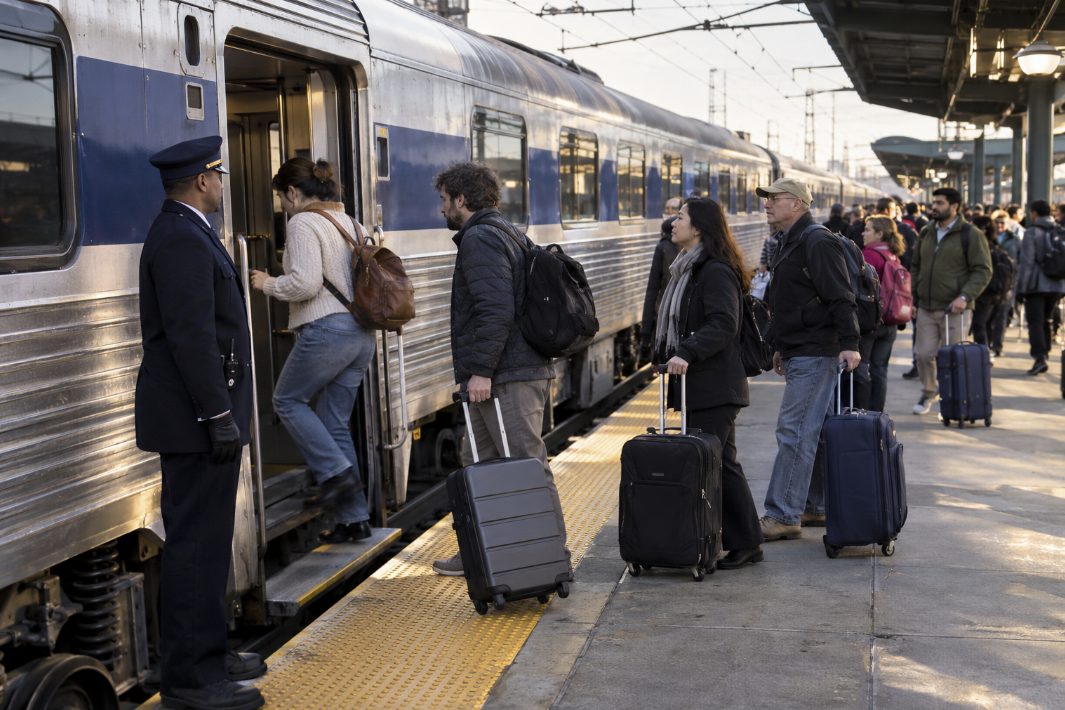
Amtrak carried more passengers than ever during its latest fiscal year, but the financial result still included an operating loss. The railroad reported 37.1 million customer trips for the year ended September 30, an increase of 7.4%. Operating revenue reached $4.1 billion, while its adjusted operating loss narrowed to $492.7 million, an improvement of almost 19%. These preliminary, unaudited results show a business attracting more demand and improving its finances. They also demonstrate why record customer numbers and profitability remain separate achievements.
The revenue figures help explain that distinction. Total operating revenue increased 4.9% and included payments from state partners supporting certain routes. Gross ticket revenue reached $3 billion, rising 1% from the previous year. Customer trips therefore grew faster than either measure of revenue. That does not establish the reason for the difference, but it does show why passenger growth alone cannot explain the financial performance.
For a railroad, carrying additional passengers can make better use of an expensive service already operating. A train needs equipment, staff, maintenance and access to tracks whether every seat is occupied or some remain empty. Selling another seat can help spread those costs across more customers. Expanding capacity, however, may require additional departures, equipment and employees, creating new expenses alongside the revenue opportunity. The financial benefit depends on where demand appears and what serving it requires.
Amtrak is also investing heavily in the system that supports future travel. It reported more than $5 billion in capital investment for the second consecutive year, covering infrastructure, stations, maintenance facilities and other projects. Capital investment and adjusted operating earnings measure different things, so that spending should not simply be treated as the explanation for the reported operating loss. New trains and infrastructure improvements can support reliability and capacity over many years. Their business value depends on whether those improvements deliver a better service at a sustainable cost.
Amtrak’s national transportation role also makes its results more complicated than those of a conventional private business. It connects communities through services supported by a combination of customer revenue and public funding. A network-wide passenger record does not reveal the financial performance of every route or the wider value of the connections provided. Evaluating its progress requires attention to service quality, reliability, costs and the funding needed to maintain the network. The smaller adjusted operating loss is evidence of improvement, while the remaining gap shows that stronger demand has not yet produced an operating surplus on that measure.
For business owners, the useful lesson is to look beyond the activity that makes a company appear successful. More appointments, orders or customers can improve results, but only when the revenue and cost of serving them work together. Owners need to understand what each additional sale contributes and when growth requires another increase in capacity. Amtrak’s results show both sides of that calculation: record demand and a meaningful financial improvement, alongside a continuing loss. Growth becomes more useful when management can explain how it moves the business toward covering its costs.
Business
AI Shopping Agents Are Now Buying From Business Websites, and Bot Rules Could Cost You Holiday Sales


A new report from Cequence Security shows that artificial intelligence agents have moved from browsing business websites to acting on them. The company’s first Agentic AI Security Index, released Monday, found that the share of AI agent visits that signed in, booked, bought or managed an account rose from 1.4 percent to 13 percent between May 16 and November 15, 2026. Visits that only read or browsed fell 73 percent over the same period.
The holiday numbers are the ones to watch. At the retailers Cequence tracked, the share of agent visits that ended in a purchase rose from 0.2 percent to 3.0 percent during early holiday deals. Cequence also reported that Meta’s Muse agent accounted for 40 percent of the agent visits that went beyond browsing in its first 30 days.
There is a security side to this. Traffic from bots pretending to be AI agents while probing for secrets grew 2,600 percent, and nearly two in three of those visits posed as Perplexity agents. Real shopping agents and fake ones now look similar at the login page, and that is where the business risk sits.
Here is the problem for owners. Many companies will respond to the spike in impersonation by tightening bot rules. A rule built to stop a fake agent can also block a legitimate agent trying to complete a customer’s order. In most organizations the security team writes those rules, and the marketing or sales team finds out later from the conversion report. A simple example shows the stakes. A retailer that sees 400,000 agent visits over Black Friday through Cyber Monday and converts 3 percent would see about 12,000 orders. If new rules challenge a quarter of those agent sessions, roughly 3,000 orders disappear. That is an illustration, not a figure from the report.
This fits a wider pattern from the past two weeks. OpenAI launched Businesses in ChatGPT, which lets companies claim a profile and set up an agent to answer shopper questions, and it added ChatGPT Wallet, which lets agents complete purchases once a user approves them. Customers are starting to send software to do the shopping, calling and booking for them.
A few cautions apply. Cequence drew its data from the websites and apps it protects across six industries and did not publish a total visit count, so the percentages describe its own customer base and not the whole internet. The 3.0 percent purchase rate also comes from early holiday deals and may not hold for every business.
What businesses should do this week is practical. Have the person who runs your website or online sales sit down with whoever manages security or your hosting provider before Black Friday on November 27. Decide which verified AI agents are allowed to sign in and check out, and check agent traffic and agent orders daily through Cyber Monday. Service businesses that take bookings or answer customer questions online should ask the same thing about their own forms and scheduling pages. The goal is to keep the fake agents out without turning away the real ones that are ready to pay.
-
 Events4 days ago
Thanksgiving Day Playlist
-
 Events4 days ago
Happy Thanksgiving From T2C
-
 Events5 days ago
Count Down To Thanksgiving: Bourbon Pecan Pie With Or Without Chocolate
-

 Broadway5 days ago
The Fantasticks: Broadway Discovers a Whole New Kind of Magic
-

 Business5 days ago
AI Shopping Agents Are Now Buying From Business Websites, and Bot Rules Could Cost You Holiday Sales
-

 Broadway4 days ago
Macy’s Historic 100th Thanksgiving Day Parade Postponed: Exclusive Rehearsal Photos and Can Broadway Still Deliver?
-

 Entertainment4 days ago
Prince Mario-Max zu Schaumburg-Lippe & His Royal Family Wish America A Happy Thanksgiving!
-

 Entertainment3 days ago
Live From The Hotel Edison Times Square Chronicles Presents Actor Performer and New Composer Oliver Richman